Batch Data Pipeline Infrastructure
Sep. 10, 2026
Overview
In this article, I explore the question:
Summary
In short, I think it's useful to build on Beam, Spark, and Kubernetes.
The code for this project is at github.com/skeselj/mini-ml-stack.
Background
Batch data pipeline infrastructure allows a user to define arbitrary operations on data and execute them at scale.
Motivation
I've worked on various machine learning (ML) projects over the course of 10 years.
I've found that data infrastructure has a profound influence on what gets done. If an operation is complicated or risky, people will avoid it.
Use Case
I'd like to have a concrete, representative application to explore.
Say we have a set of videos, like this one:
She broke the women's world record here.
And say we want to run & visualize a person detection model on the video.
(Running inference is part of training & evaluation of ML functionality).
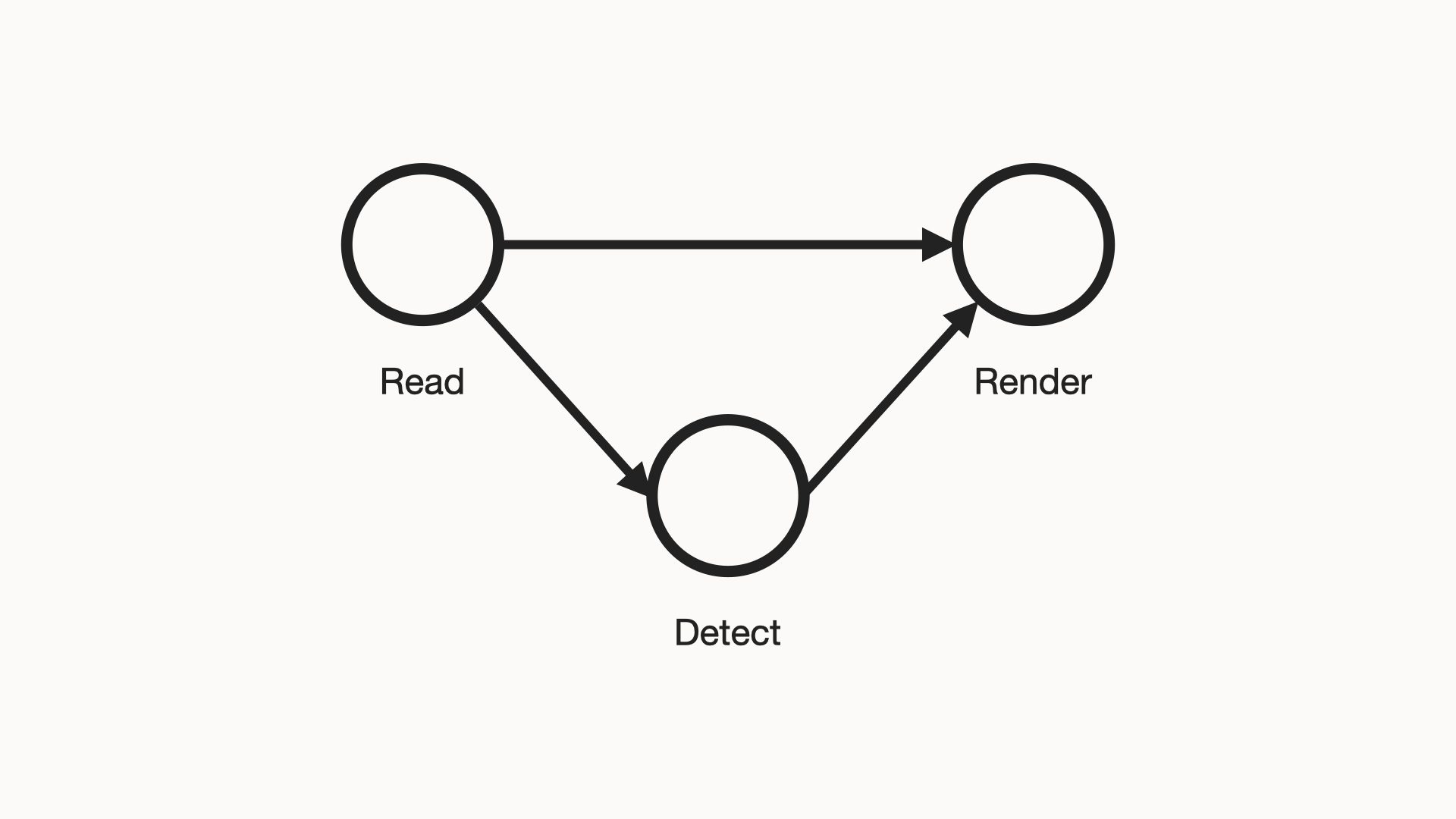
The high-level pipeline we'd like to run is represented in this diagram:
Challenges
To implement this pipeline, 2 key properties need to be attained:
- Correctness. We need to implement the basic functions of the above pipeline.
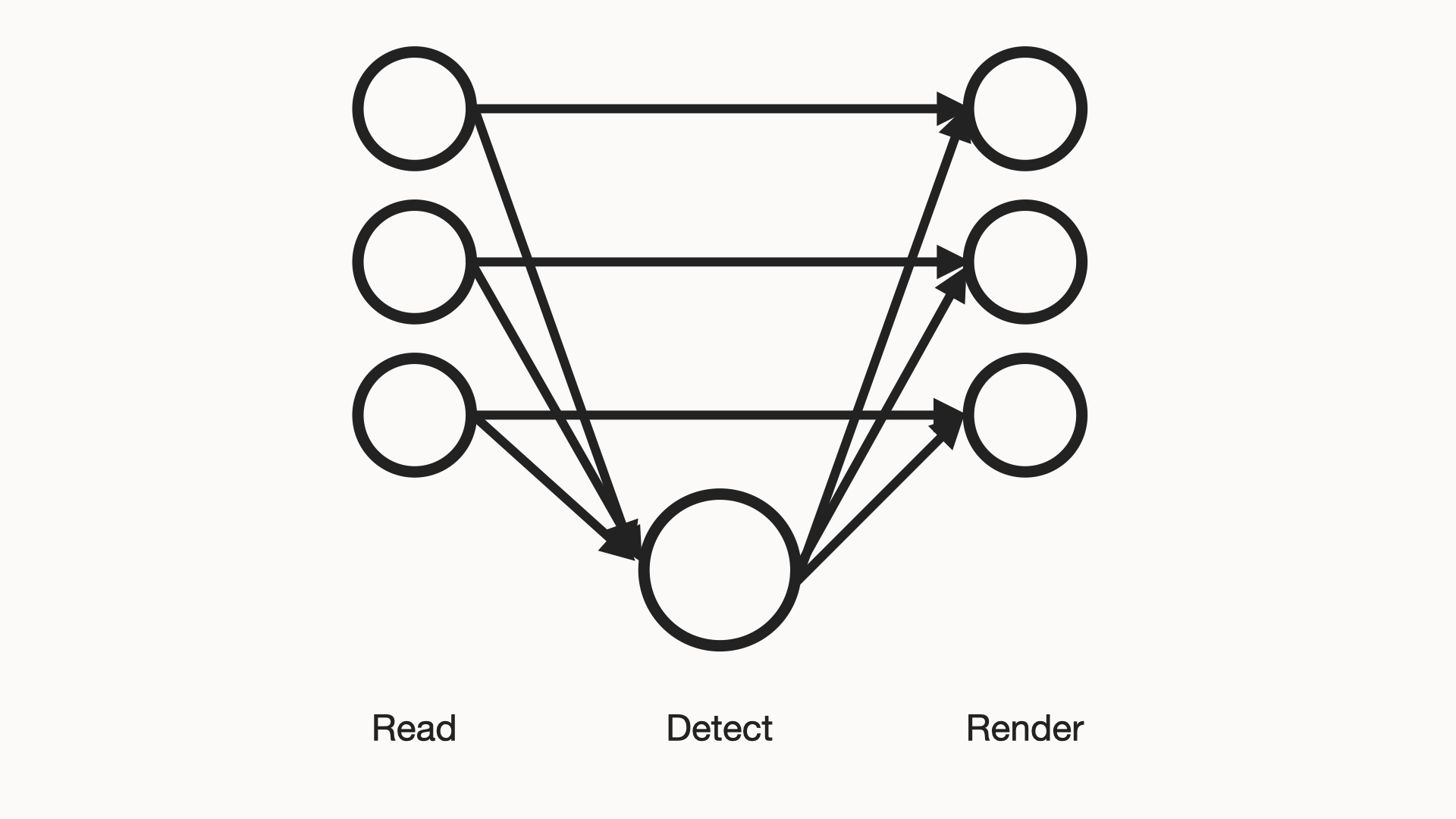
- Scalability. We need to implement them in a way that scales with more resources.
Modularity is important because it will likely be effective to non-uniformly scale stages:
The 2 properties above naturally lend themselves to 2 settings:
- Single-machine. Convenient for attaining correctness.
- Multi-machine. Necessary for attaining scalability.
Here lies the key challenge to be respected:
Excellent infrastructure must support both above settings in a seamless way.
Proposed Solution
I've described the use case and challenges, what do I think is the best solution?
To start, consider the functions that need to be fulfilled. My view on them:
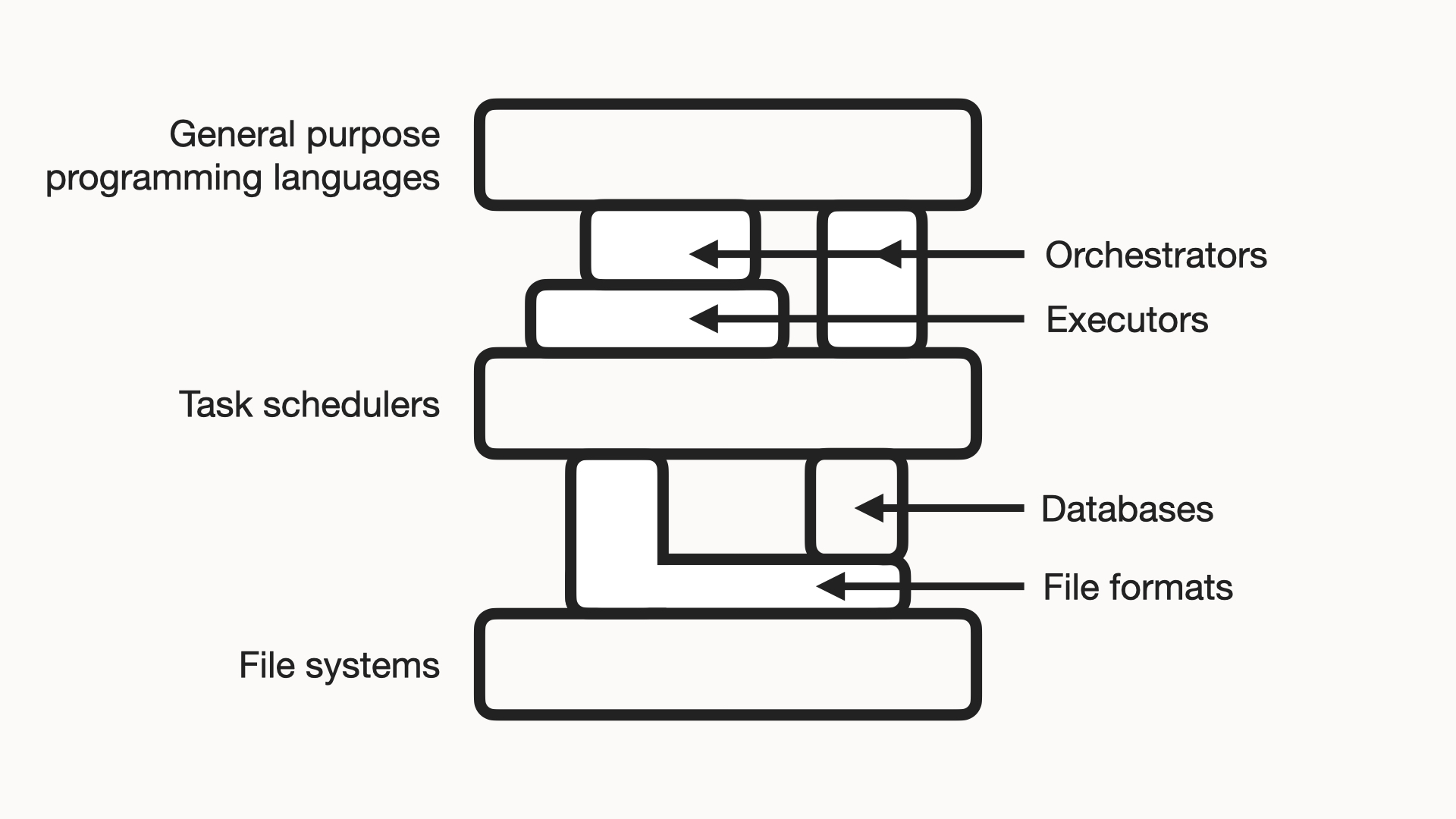
I think these are some strong open-access implementations of the above functions:
| Function | Technology | Notes |
|---|---|---|
| General purpose programming languages | Python, C++ |
|
| Orchestrators | Prefect, Beam |
|
| Executors | Spark | |
| Task schedulers | Slurm, Kubernetes |
Managing an on-premises cluster, e.g. with Slurm, can be cost effective. |
| Databases | Redis, SQLite, PostgreSQL |
|
| File formats | NPZ, HDF5, JPG, MP4, Parquet |
|
| File systems | Lustre, GCS, S3 |
Managing an on-premises cluster, e.g. with Lustre, can be cost effective. |
I think Beam, Spark, and Kubernetes are particularly powerful, as I'll describe.
Demonstration
I'll apply the above stack to the above use case, on my desktop.
Single-machine setting for correctness
To start, I'll create a basic, correct version of the pipeline.
Code: person_detection.py.
In this file I implement the stages in simple Python:
- Read:
get_frame_batches - Detect:
detect_in_batches - Render:
render_frames&write_video
I can get the pipeline to process this 2:10 video in 1:50 on my desktop:
=================================================================================
Resources
---------------------------------------------------------------------------------
CPU  AMD Ryzen 5 3600 6-Core Processor (6 cores / 12 threads)
RAM  15,932 MiB
GPU  NVIDIA GeForce RTX 2060 (6,144 MiB)

=================================================================================
Top-line statistics
---------------------------------------------------------------------------------
Wall clock time         110.6 s
Samples                 2,086 @ 50 ms
Mean CPU usage          132% of 1,200% (1.3 of 12 cores busy)
Peak RSS usage          9,862 / 15,932 MiB (62%)
Time in GPU phases      26.2% (29.0 s)
GPU usage p50/p90/max   2%/62%/76% (idle baseline: 3%)
Peak GPU used           4,268 / 6,144 MiB (69%, incl. other processes)
Peak torch allocated    1,971 MiB
Peak torch reserved     2,326 MiB

=================================================================================
Per-phase statistics

phase         calls    wall s  % wall      cpu    peak rss  gpu util     peak gpu
---------------------------------------------------------------------------------
encode        3,256     41.46   37.5%     103%   9,860 MiB        8%       41 MiB
render        3,256     24.07   21.8%     103%   9,860 MiB        7%       41 MiB
detect           51     19.63   17.8%     104%   9,862 MiB       49%    1,254 MiB
decode          123     11.22   10.2%     456%   9,862 MiB        2%       41 MiB
warmup            1      9.34    8.5%      38%   5,596 MiB        2%       64 MiB
---------------------------------------------------------------------------------
accounted              105.73   95.6%

=================================================================================
Notes
---------------------------------------------------------------------------------
"cpu" column is for this process, summed over cores. 100% is one busy core.
"gpu util" column is coarse (1s driver window) and over all processes.
"accounted" row should be 100%. If more/less, there's over/under counting.
Tigst Assefa finishing the 2023 Berlin Marathon.
Analysis of GPU stages
GPUs are costly devices, so I'd like to see what I'm getting out of mine.
When my GPU is on, I see:
Wall clock time         110.6 s

phase         calls    wall s  % wall      cpu    peak rss  gpu util     peak gpu
---------------------------------------------------------------------------------
encode        3,256     41.46   37.5%     103%   9,860 MiB        8%       41 MiB
render        3,256     24.07   21.8%     103%   9,860 MiB        7%       41 MiB
detect           51     19.63   17.8%     104%   9,862 MiB       49%    1,254 MiB
decode          123     11.22   10.2%     456%   9,862 MiB        2%       41 MiB
warmup            1      9.34    8.5%      38%   5,596 MiB        2%       64 MiB
---------------------------------------------------------------------------------
accounted              105.73   95.6%

...
ran detection on 64 frames, 5.5 ms/frame; profile: detect: 353 ms, CPU 102%, GPU 76% mean GPU util, 1,088 MiB peak torch alloc
ran detection on 64 frames, 5.5 ms/frame; profile: detect: 350 ms, CPU 106%, GPU 76% mean GPU util, 1,087 MiB peak torch alloc
ran detection on 56 frames, 5.5 ms/frame; profile: detect: 309 ms, CPU 107%, GPU 76% mean GPU util, 1,126 MiB peak torch alloc
Whereas when I turn it off, I see:
Wall clock time         255.1 s

phase         calls    wall s  % wall      cpu    peak rss  gpu util     peak gpu
---------------------------------------------------------------------------------
detect           51    175.11   68.6%     682%   9,268 MiB        0%        0 MiB
encode        3,256     42.63   16.7%     100%   9,267 MiB        0%        0 MiB
render        3,256     22.10    8.7%     101%   9,267 MiB        0%        0 MiB
decode          123      8.76    3.4%     544%   9,268 MiB        0%        0 MiB
warmup            1      3.86    1.5%      87%   5,039 MiB        0%        0 MiB
---------------------------------------------------------------------------------
accounted              252.47   99.0%

...
ran detection on 64 frames, 43.0 ms/frame; profile: detect: 2,750 ms, CPU 766%, GPU 0% mean GPU util, 0 MiB peak torch alloc
ran detection on 64 frames, 43.5 ms/frame; profile: detect: 2,785 ms, CPU 760%, GPU 0% mean GPU util, 0 MiB peak torch alloc
ran detection on 56 frames, 43.8 ms/frame; profile: detect: 2,451 ms, CPU 768%, GPU 0% mean GPU util, 0 MiB peak torch alloc
A (175.11 s / 19.63 s) ~= 8.9x speedup on the "detect" stage.
From a basic search, it seems the costs of these resources on Google Cloud are about:
- $0.19/h for an "n1-standard-4" 4-core CPU node
- $0.54/h for an "n1-standard-4-t4" 4-core CPU & T4 GPU node
A ($0.54 / $0.19) ~= 2.8x cost difference.
So, when scaling this pipeline, it would make sense to pay for a GPU to run detection on.
- The stage would be ~8.9x faster.
- And (175.11 s / 19.63 s) / ($0.54 / $0.19) ~= 3.1x cheaper.
Analysis of CPU stages
The video output stages seem to take longest. 59% of time on "render" & "encode".
Probably, these stages can be sped up by using the GPU.
Multi-machine setting for scalability
Now, let's say I want to scale the above pipeline.
Code: person_detection_beam.py.
In this file I re-use the above functions to implement the stages in the Python Beam API:
- Read:
beam.Create(split_video) - Detect:
beam.ParDo(DetectChunk) - Render:
beam.ParDo(RenderChunk)&beam.Map(concatenate_in_order)
I set up a kind (Kubernetes in Docker) cluster on my desktop, to simulate
having a large Kubernetes cluster to run on (see
kind-config.yaml,
k8s, &
docker).
I can submit my pipeline to that cluster:
$ python person_detection_beam.py ../data/sports/womens_marathon_record_2023.mp4 \
>     --video-chunk-size-s 10 \
>     --runner=PortableRunner \
>     --worker-root /mnt/project \
>     --job_endpoint=localhost:8099 \
>     --artifact_endpoint=localhost:8098 \
>     --environment_type=EXTERNAL \
>     --environment_config=localhost:50000
Split ../data/sports/womens_marathon_record_2023.mp4 into 13 chunk(s)
Job state changed to STOPPED
Job state changed to STARTING
Job state changed to RUNNING
Job state changed to DONE
Wrote ../data/sports/womens_marathon_record_2023_output.mp4
And watch it run:
$ kubectl get nodes
NAME                         STATUS   ROLES           AGE   VERSION
mini-cluster-control-plane   Ready    control-plane   19h   v1.31.0

$ kubectl get pods
NAME                               READY   STATUS                     RESTARTS      AGE
beam-job-server-659fdf49dc-2tvsz   1/1     Running                    0             3m40s
spark-master-c997cf78b-sg8n6       1/1     Running                    1 (12h ago)   19h
spark-worker-7977679bfc-t95vf      2/2     Running                    0             12h
Discussion
This setup has some positive qualities:
- Modularity. I implemented the core pipeline logic in plain Python; translating it to the multi-machine setting with Beam did not have much overhead.
- Scalability. If I want to run any pipeline stage on more machines, that is well supported by Spark & Kubernetes.
- Portability. If I want to change my compute infrastructure, e.g. from one cloud to another, that is well supported, because Kubernetes is standard.
Conclusion
In this post, I demonstrated a Beam-Spark-Kubernetes stack for batch data pipelines.
I think it has some favorable properties: modularity, scalability, and portability.
Further Work
Next, I'd like to have a nice way of visualizing Spark nodes running on Kubernetes.
Related Work
beam.apache.org/ Apache Beam Programming Guidejaceklaskowski.github.io/ Spark on Kubernetes