Making Neural Networks Run Fast
Sep. 18, 2026
Overview
In this post, I benchmark some core neural network performance optimizations.
Summary
I explore these 7 actions, for a vision application:
- pre-fetch data
- tune data loading thread count
- page-lock data
- select model operations well
- align tensor memory layouts
- compile operation kernels
- reduce parameter precision
I reach a bottleneck defined by my HDD's latency.
The code for this project is at github.com/skeselj/unet-perf.
Motivation
Speed can make a qualitative difference [1] for machine learning research & products.
Scope
The space of all neural net methods is large. I'll narrow to simple CNN methods.
The space of all devices is large. I'll narrow to my RTX 2060 equipped desktop.
Use Case
I need a concrete application to optimize.
I'll pick the segmentation task. I think it's the most simply posed task in vision [2].
And I'll pick the 2017 Carvana Kaggle dataset; it's simple but not trivial.
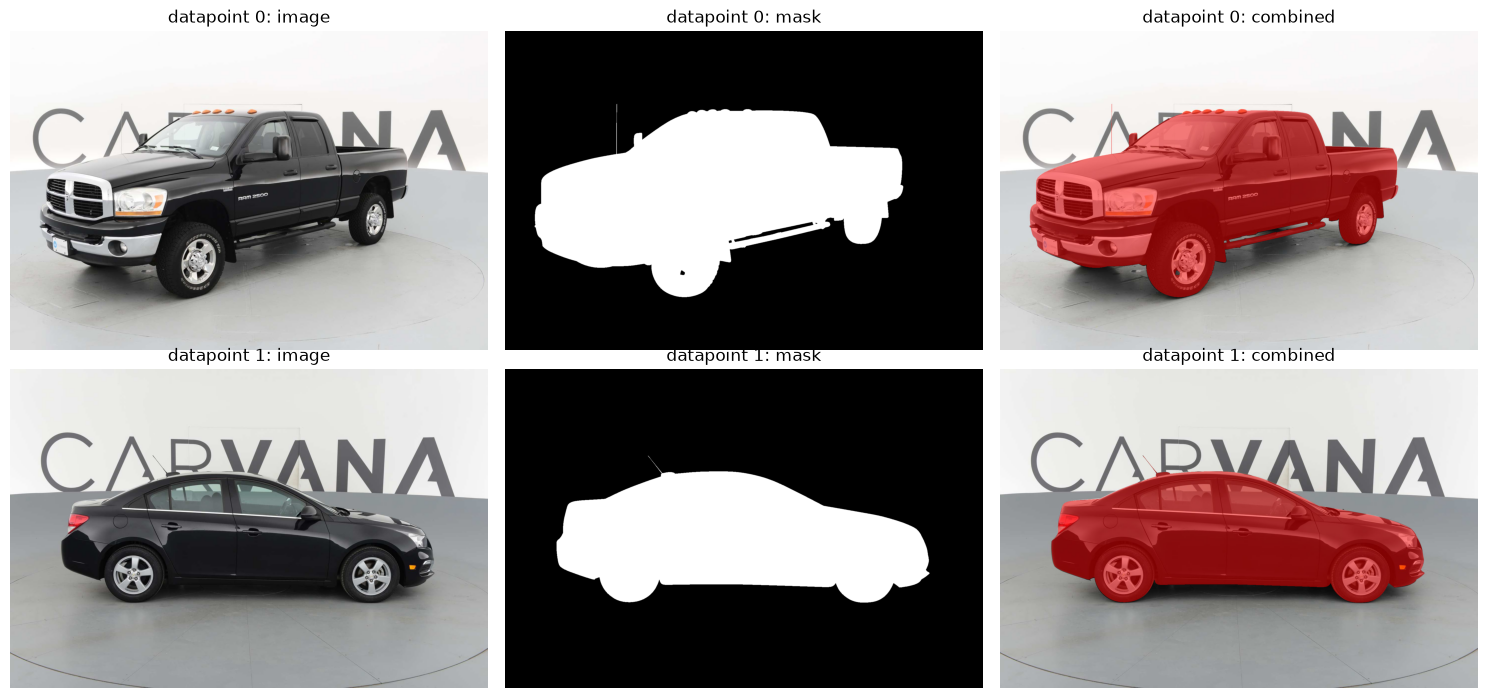
I'll pick the U-Net model family. It's simple but also non-trivially expressive.
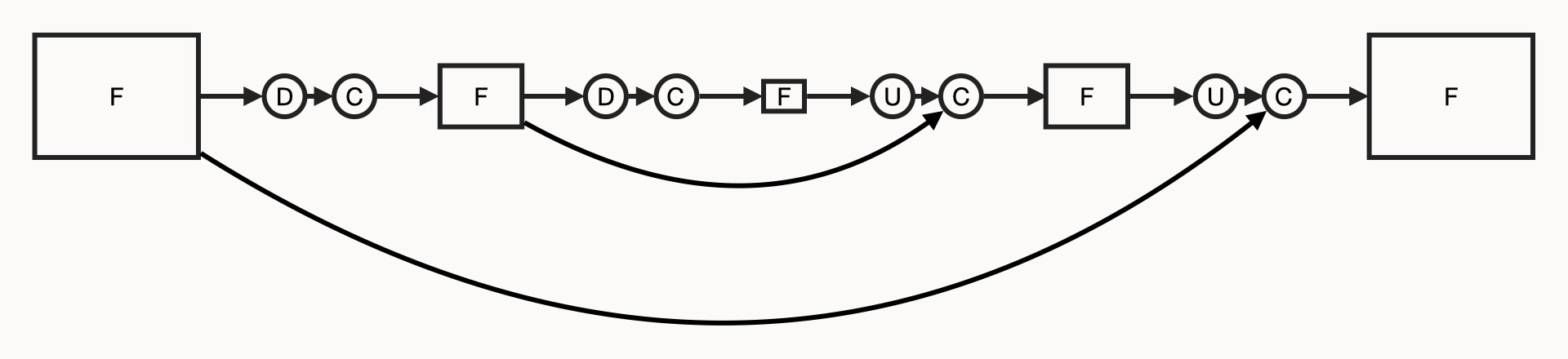
"F" - feature maps, "C" - convolution operations,
"D" - downsampling operations, "U" - upsampling operations.
Baseline
To start, I need a simple, correct version of the application. Then I'll optimize.
Code:
I can start a simple training:
PROFILE_RESOURCES=1 PROFILE_RESOURCES_TORCH=1 \
python training.py
Which will use about 0.75 epochs of our dataset:
    train_unet_from_scratch_on_carvana(
        train_datapoint_count=3000,  # About 0.75 of an epoch.
        val_datapoint_count=60,
        batch_size=6,
        log_every_n_datapoints=500
    )
I set up an 80-20 train-val split, and a 5-level U-Net:
Loaded Carvana dataset from ('./data/carvana/train', './data/carvana/train_masks').
	There are 5,088 datapoints (4,064 train, 1,024 val).
	There are 318 cars (254 train, 64 val).
Defined a U-Net over 5 levels, with (C, H, W) shaped feature maps.
	level 0: encoder (  32,  256,  384), decoder (  32,  256,  384)
	level 1: encoder (  64,  128,  192), decoder (  64,  128,  192)
	level 2: encoder ( 128,   64,   96), decoder ( 128,   64,   96)
	level 3: encoder ( 256,   32,   48), decoder ( 256,   32,   48)
	level 4: encoder ( 512,   16,   24), decoder none
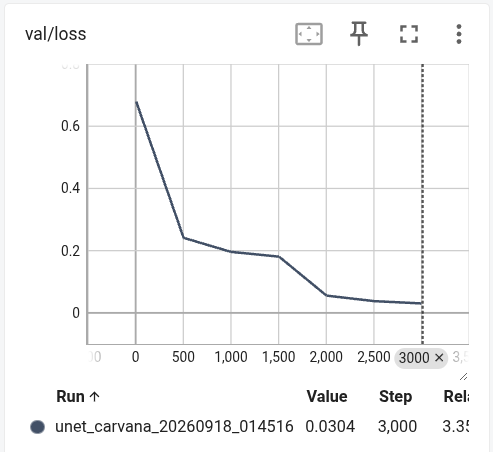
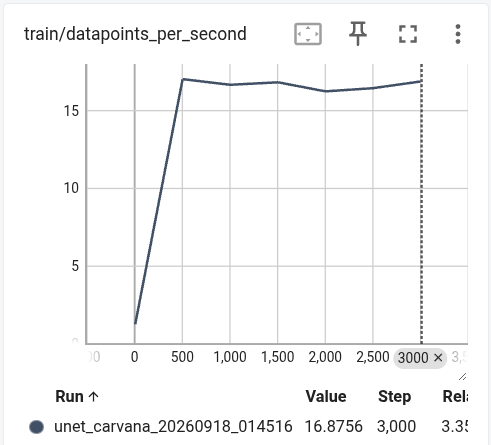
Metrics for the training trend in a good direction:
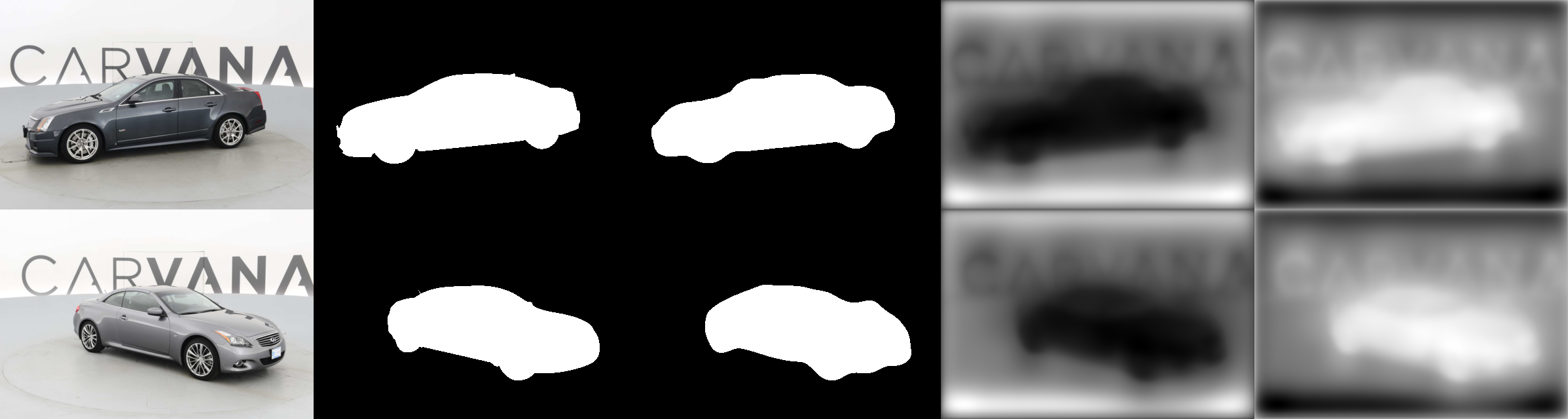
And model predictions start looking good quickly:
Profiling gives us a sense of current performance:
- (3,000 datapoints) / 217.5s = 13.8 datapoints / s.
- Peak GPU memory allocated by PyTorch: 2.6 GiB.
============================================================================================
Resources
--------------------------------------------------------------------------------------------
CPU  AMD Ryzen 5 3600 6-Core Processor (6 cores / 12 threads)
RAM  15,932 MiB
GPU  NVIDIA GeForce RTX 2060 (6,144 MiB)

============================================================================================
Top-line statistics
--------------------------------------------------------------------------------------------
Wall clock time         217.5 s
Samples                 4,105 @ 50 ms
Mean CPU util           126% of 1,200% (1.3 of 12 cores busy)
Peak RSS usage          1,896 / 15,932 MiB (12%)
Time in GPU phases      74.2% (161.5 s)
Peak GPU usage          6,070 / 6,144 MiB (99%, incl. other processes)
GPU util. p50/p90/max   80%/90%/100% (idle baseline: 19%)
Peak torch allocated    2,662 MiB
Peak torch reserved     3,554 MiB

============================================================================================
Per-phase statistics

phase                 calls  wall (s)  wall (%)      cpu    peak rss   gpu util     peak gpu
--------------------------------------------------------------------------------------------
infer on train batch    500    148.30     68.2%     139%       1,812 MiB        80%        2,548 MiB
load raw data           563     50.24     23.1%      91%       1,881 MiB        72%          909 MiB
infer on val batch       63      6.77      3.1%     181%       1,863 MiB        50%        1,390 MiB
define model              1      6.42      3.0%      34%         764 MiB        18%           30 MiB
log for train batch       7      2.02      0.9%     121%       1,812 MiB        67%          601 MiB
log for val batch        14      1.62      0.7%     153%       1,896 MiB        60%          994 MiB
save checkpoint           1      0.25      0.1%     119%       1,814 MiB        33%          515 MiB
--------------------------------------------------------------------------------------------
accounted                      215.60   99.1%

============================================================================================
Notes
--------------------------------------------------------------------------------------------
CPU util. is summed over all cores; 100% is 1 busy core.
GPU usage is coarse (1s window) over all processes on machine.

Torch operations over 3 steps:
-------------------------------------------------------  ------------  ------------  ------------  ------------  ------------  ------------  ------------  ------------  ------------  ------------
                                                   Name    Self CPU %      Self CPU   CPU total %     CPU total  CPU time avg     Self CUDA   Self CUDA %    CUDA total  CUDA time avg    # of Calls
-------------------------------------------------------  ------------  ------------  ------------  ------------  ------------  ------------  ------------  ------------  ------------  ------------
                                          ProfilerStep*         0.00%       0.000us         0.00%       0.000us       0.000us        1.160s       102.31%        1.160s     386.574ms             3
                             aten::convolution_backward         0.52%       6.669ms         1.34%      17.195ms     238.823us     578.734ms        51.06%     602.784ms       8.372ms            72
_5x_cudnn_volta_scudnn_winograd_128x128_ldg1_ldg4_re...         0.00%       0.000us         0.00%       0.000us       0.000us     273.078ms        24.09%     273.078ms       2.601ms           105
                                aten::cudnn_convolution         0.24%       3.100ms         0.53%       6.768ms      93.998us     225.419ms        19.89%     226.218ms       3.142ms            72
void wgrad_alg0_engine_NHWC<float, 512, 6, 5, 3, 3, ...         0.00%       0.000us         0.00%       0.000us       0.000us     136.083ms        12.01%     136.083ms       5.670ms            24
void cudnn::engines_precompiled::nhwcToNchwKernel<fl...         0.00%       0.000us         0.00%       0.000us       0.000us      93.483ms         8.25%      93.483ms     288.528us           324
                                              decoder_0         0.00%       0.000us         0.00%       0.000us       0.000us      88.683ms         7.82%      88.683ms      29.561ms             3
                                            aten::copy_         0.24%       3.029ms         3.43%      43.910ms     150.893us      85.659ms         7.56%      85.659ms     294.360us           291
void cudnn::engines_precompiled::nchwToNhwcKernel<fl...         0.00%       0.000us         0.00%       0.000us       0.000us      68.758ms         6.07%      68.758ms     424.433us           162
void cudnn::detail::dgrad_engine<float, 128, 6, 8, 3...         0.00%       0.000us         0.00%       0.000us       0.000us      61.285ms         5.41%      61.285ms       6.809ms             9
                                              decoder_1         0.00%       0.000us         0.00%       0.000us       0.000us      54.272ms         4.79%      54.272ms      18.091ms             3
void at::native::elementwise_kernel<128, 2, at::nati...         0.00%       0.000us         0.00%       0.000us       0.000us      52.973ms         4.67%      52.973ms     189.868us           279
                                              encoder_0         0.00%       0.000us         0.00%       0.000us       0.000us      49.311ms         4.35%      49.311ms      16.437ms             3
                                             aten::add_         0.09%       1.178ms         0.14%       1.792ms       7.283us      44.869ms         3.96%      44.869ms     182.396us           246
                                              decoder_2         0.00%       0.000us         0.00%       0.000us       0.000us      38.124ms         3.36%      38.124ms      12.708ms             3
-------------------------------------------------------  ------------  ------------  ------------  ------------  ------------  ------------  ------------  ------------  ------------  ------------
Self CPU time total: 1.282s
Self CUDA time total: 1.134s
Overall, this baseline seems reasonable.
Optimizations
Now I'd like to dive into optimizations; I'll describe them then measure them.
1. pre-fetch data
Key idea: while the GPU is working to generate predictions for the current images, have the CPU work on loading the next images.
Usage: the DATA_PREFETCH_DEPTH env var in my codebase. The prefetch_factor
param in torch.DataLoader.
2. tune data loading thread count
Key idea: select a good amount of threads to use when loading datapoints.
On my 6-core, 12-thread CPU, using 12 threads seems best.
Usage: the DATA_WORKER_COUNT env var in my codebase. The num_workers
param in torch.DataLoader
(but note, this is slightly different; this controls process count, not thread count).
3. page-lock data
Key idea: after data is loaded into memory (RAM), call torch.Tensor.pin_memory to keep its address stable and make it directly accessible by the GPU.
Usage: the PIN_DATA env var in my codebase. The pin_memory param in
torch.DataLoader.
4. select model operations well
Key idea: be aware of where different model operations are on the cost-quality curve.
E.g. for U-Net, one could reasonably implement the upsampling operation with
convolution + bilinear upsampling (_UpSampleOp_UpConv), but similar
functionality can be accomplished in less time with strided transposed
convolution (_UpSampleOp_Deconv).
Usage: the USE_DECONV_UPSAMPLE env var in my codebase.
5. align tensor memory layouts
Key idea: minimize conversions between different tensor memory layouts.
The 2 most common ways tensors are arranged on GPUs are NCHW-order and
NHWC-order.
E.g. if an image is stored in
NHWC-order, the RGB values for each pixel will be stored next to each other.
Converting between the 2 layouts takes work, so avoiding that saves time.
One tool for avoiding it is to call torch.Tensor.contiguous
once on a tensor, which will copy it to NCHW-order, the default in PyTorch.
For this application, this is relevant, because PIL
will load images in NHWC-order.
Usage: the MAKE_DATA_CONTIGUOUS env var.
6. compile operation kernels
Key idea: call torch.compile on relevant computational graphs, which
will run logic that simplifies the kernels that execute the graphs on the GPU.
Usage: the COMPILE_MODEL env var.
7. reduce parameter precision
Key idea: make the model accomplish similar functionality with smaller parameter data types.
This is a large domain; key words: "reduced precision", "quantization".
In this project, I use a simple form. fp32 is used when training the model.
Before inference, I cast those params to fp16.
Usage: quantization.py, in my codebase.
Results
Finally, I'll profile the optimizations.
I'll run a cumulative sequence of profiled training & inference runs.
Ahead of each, I'll clear cached disk pages, to simulate random access of a dataset:
sync; echo 1 | sudo tee /proc/sys/vm/drop_caches
Training
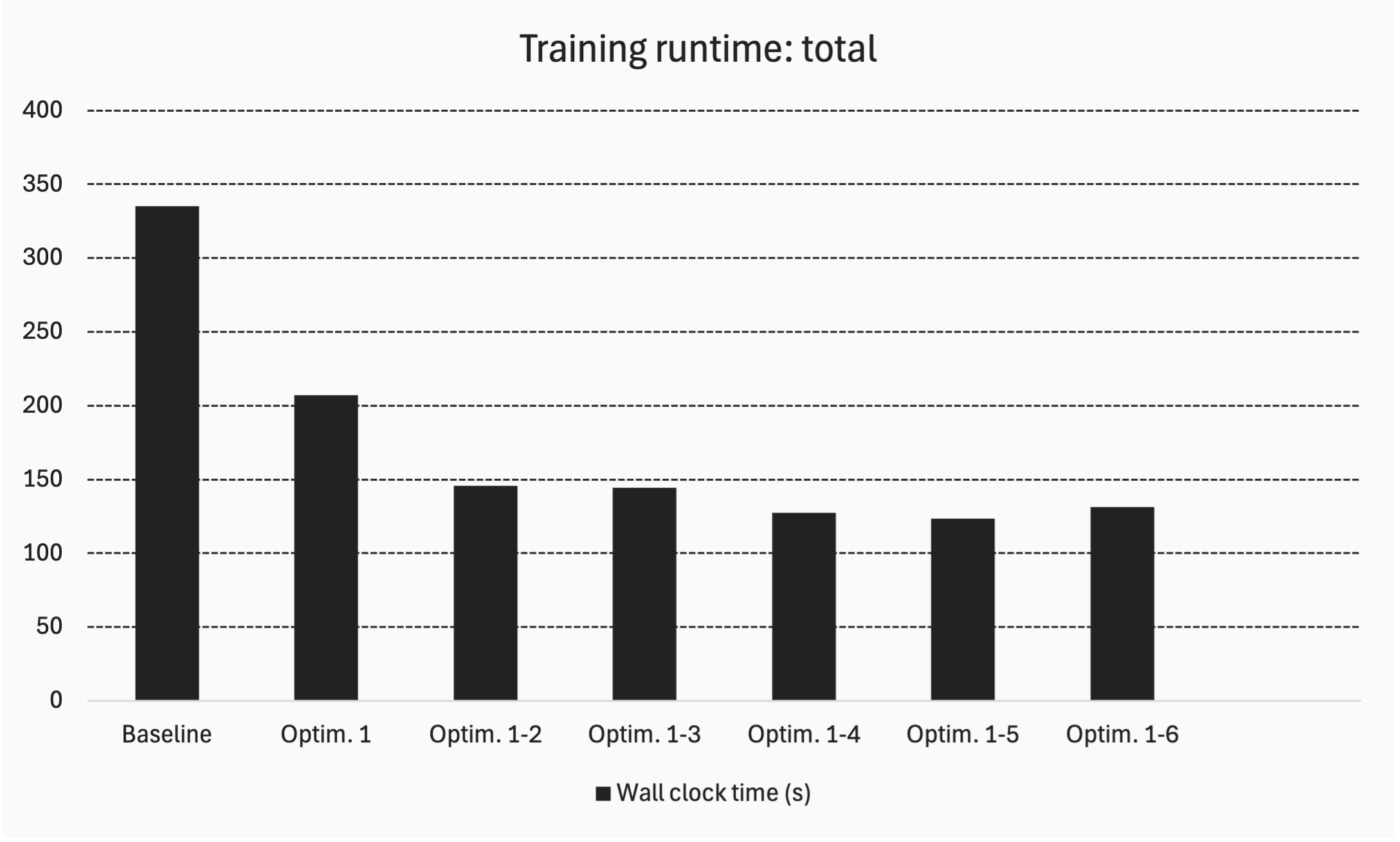
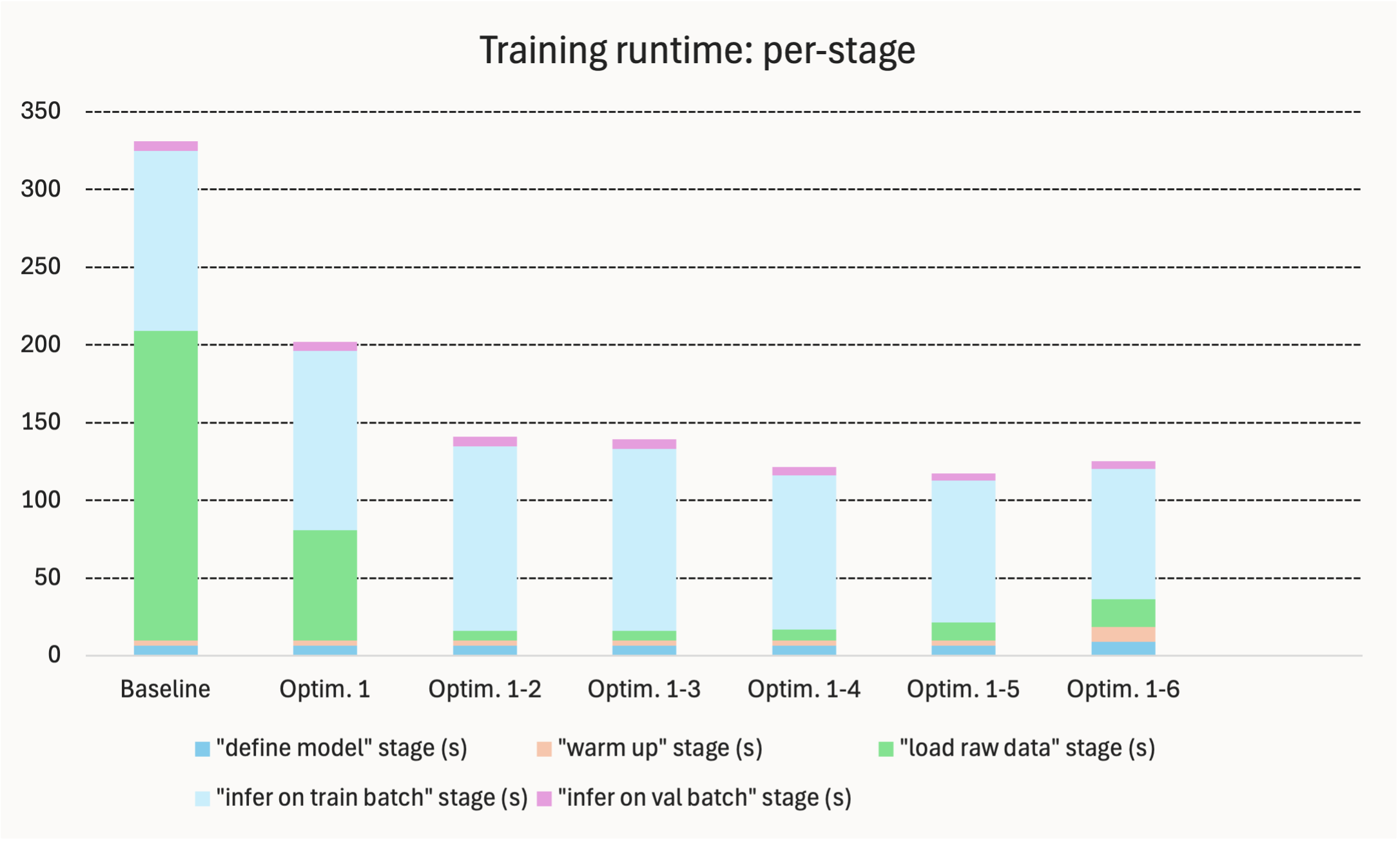
These charts show training runtime when optimizations are applied cumulatively:
Key points:
- Data loading time can be cut to a small percentage by optimizations 1 & 2.
- Toward the end, GPU-side gets faster, and CPU-side creeps up.
Inference
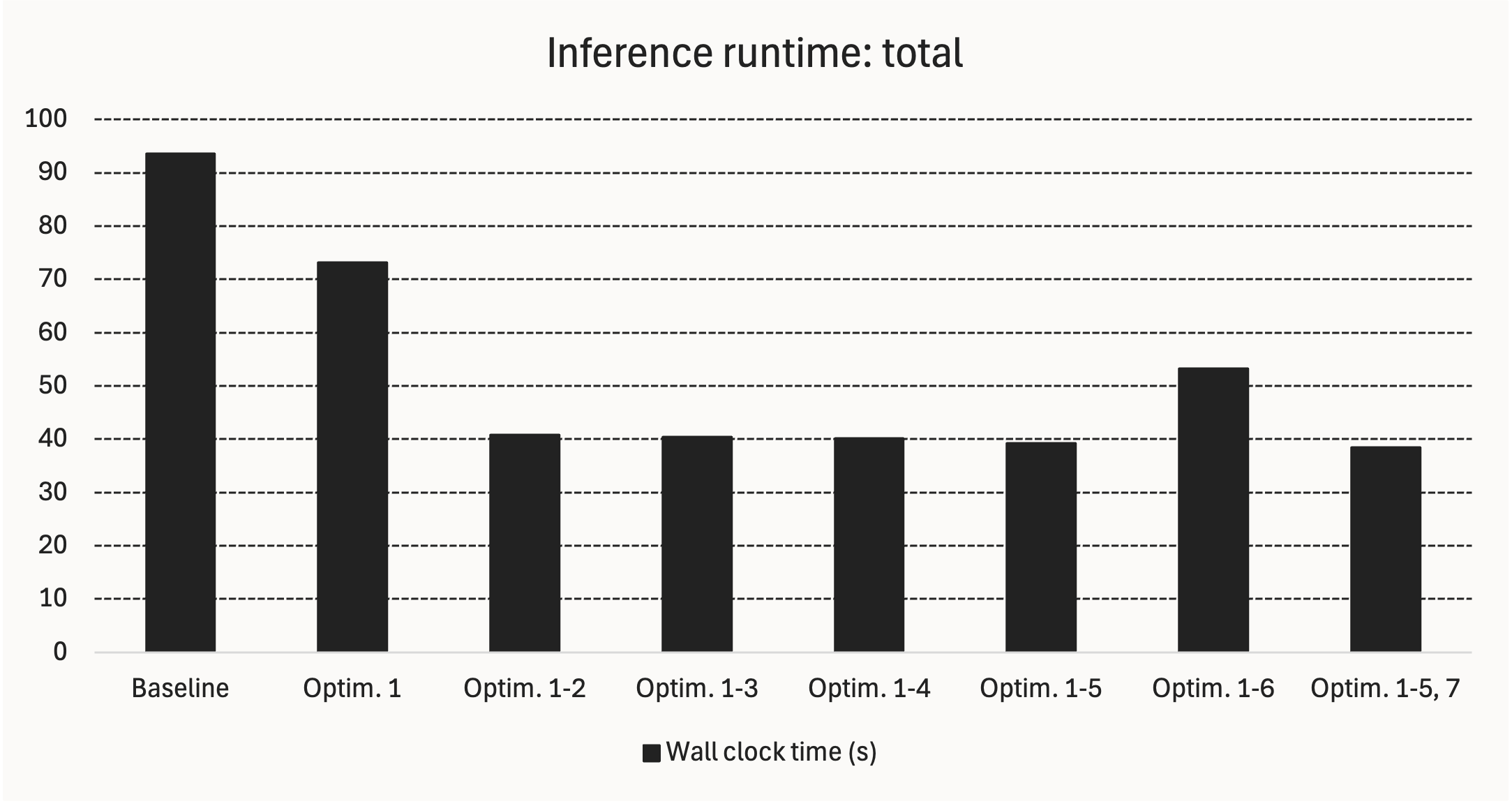
These charts show inference runtime when optimizations are applied cumulatively:
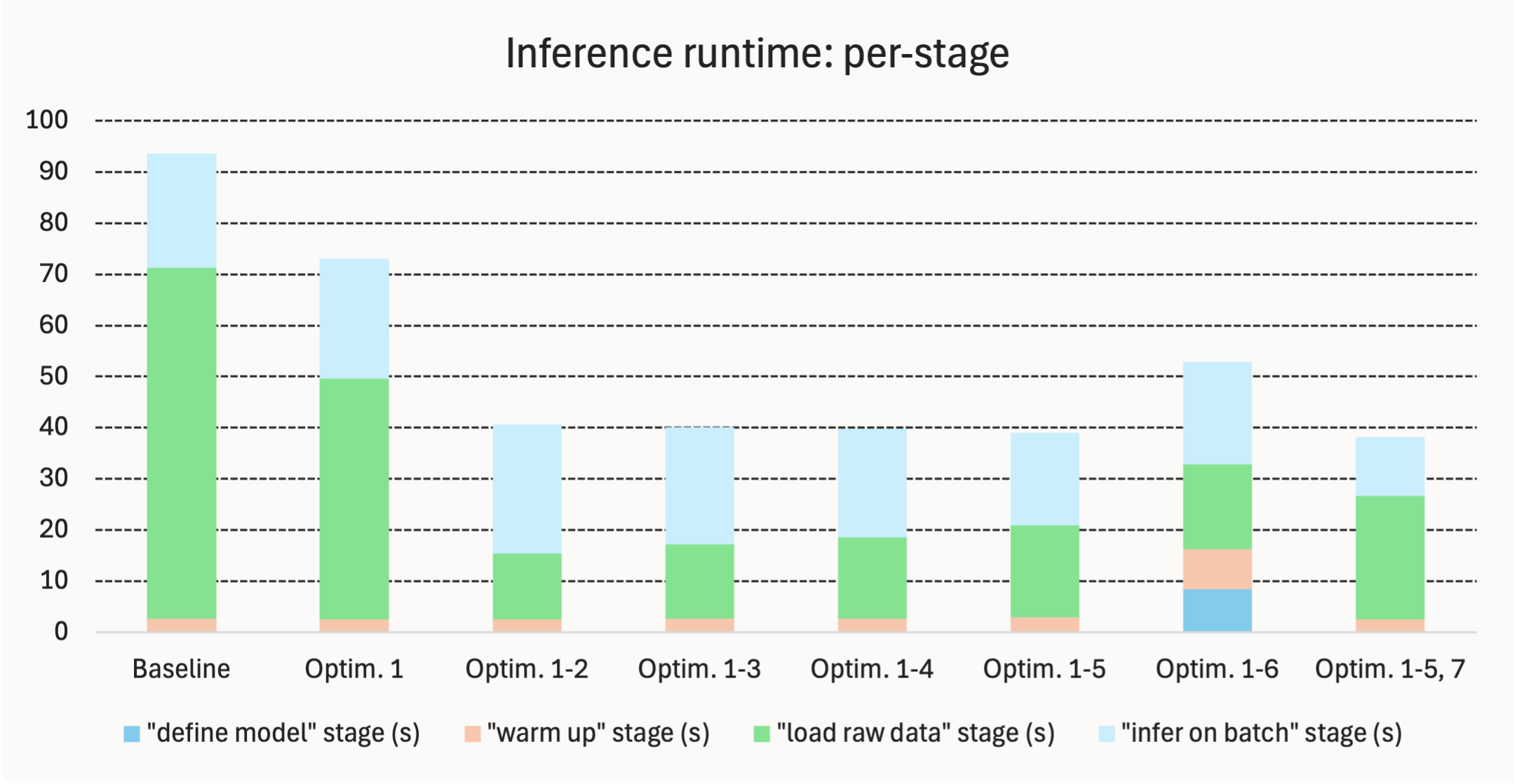
Key points:
- Like above, when GPU side gets very fast, CPU-side becomes the bottleneck.
- Optimization 6 (torch compile) incurs an up-front cost for not much gain.
Quality
This chart shows validation pixel accuracy, when optimizations are applied cumulatively:
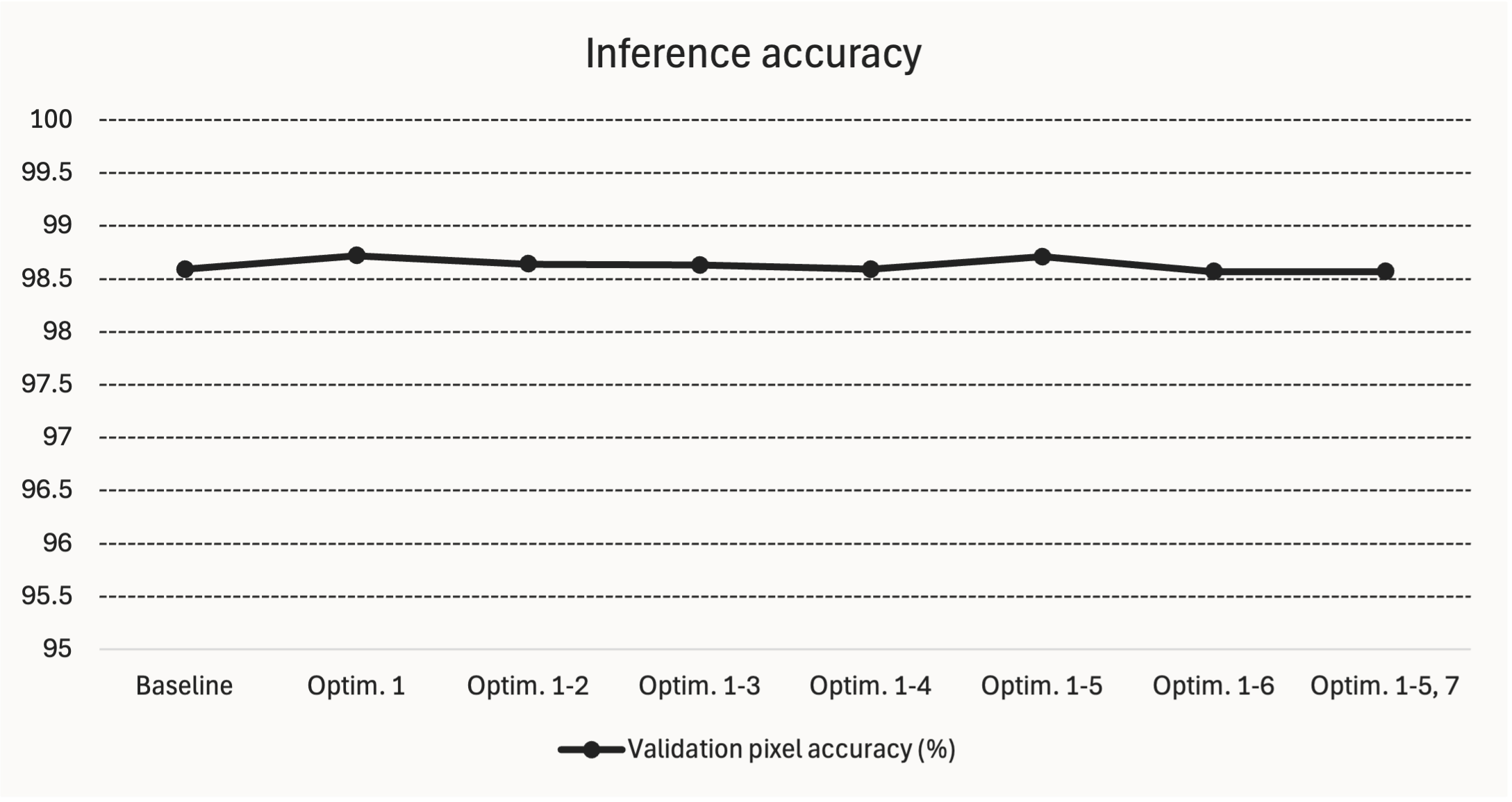
Key point: the speed optimizations seem to not affect model quality much.
Discussion
I think there are 2 surprising observations above:
-
torch.compile didn't do much. I think this is because U-Net is a simple architecture that uses common operations; the compiler doesn't change much.
-
CPU-side became the bottleneck. Once the GPU-side got fast enough, the bottleneck shifted to disk I/O.
Conclusion
In this project, I applied 7 CPU & GPU optimizations to training & inference with a CNN. They about halved runtime.
Eventually, savings on the GPU side started to not matter, because then the CPU side (specifically, disk I/O) became the bottleneck.
Further Work
SSD devices have a lot higher throughput than HDD ones; I'd like to try putting a large dataset on an SSD to alleviate the disk bottleneck.
Related Work
dando18.github.io/ Understanding the Roofline Modelaleph-alpha.com/en/ Scaling Pre-Training in Practice: A Hierarchical Approach
Footnotes
E.g. a feedback loop that gets back to you in 3h vs. 3d can result in a different research trajectory, not just a faster version of the same trajectory. ↩︎
You might say: "isn't whole-image classification simpler?" I think it's less simply posed because you could have many classes in an image. With per-pixel classification, it's more feasible to have 1 unambiguous class per pixel. ↩︎